
Design Evolution & Background
Why HandShake Exists
This project started with a conversation about a decade ago with a technologist at a specialist college who asked: “Can we use gesture recognition to help our students access communication?”
The challenge was clear. Of the 97 million people worldwide who need AAC (Augmentative and Alternative Communication), many cannot use existing technologies because their motor control doesn’t fit the required access methods. Eye-tracking requires stable gaze. Switches need reliable button presses. Keyboards need precise hand coordination.
But some of these people can make intentional movements—a hand shake, a foot tap, something their body can reliably do. The question was: could we build a system that turns those movements into AAC access?
The User-Centered Design Process
Rather than building something in a lab and hoping it worked, we followed a user-centered design (UCD) methodology. This meant:
- Define the target users: People at specialist colleges who can make intentional limb movements but cannot use existing AAC methods
- Iterate with feedback: At each stage, get input from the people using the system and their support workers (technologists, occupational therapists, speech therapists)
- Test in the real world: Don’t just demonstrate in labs; test where people actually live and work
- Adapt to individuals: The system should work for their movements, not force them to match predefined gestures
This is fundamentally different from typical gesture recognition research, which often asks users to replicate predefined gestures (swipes, specific hand positions, etc.). With cerebral palsy and similar conditions, that’s not practical. People’s movements are variable, jerky, and unique. So the system had to adapt to them.
Version 0: Early Smart Watches (2014-2016)
We started with what was available at the time.
Pebble Smart Watch
The Pebble had an accelerometer and Bluetooth, so we thought: perfect, let’s build on this.
What we learned: It didn’t work reliably. The Pebble’s Bluetooth was designed for periodic connection to a phone, not continuous streaming of accelerometer data to a computer. Getting real-time data proved impossible.
EZ430-Chronos (Texas Instruments)
This watch came with a receiver dongle, so we could actually get data streaming to a PC.
What worked: We could see accelerometer data in real-time
What didn’t work: The sampling rate was too limited for our algorithms and the hardware was already becoming outdated
Sparkfun WiTilt
I found some old sensor boards in a lab. These actually worked well, but they were discontinued and unobtainable.
Key lesson: We needed to build on widely available, current hardware. Whatever we chose had to be something other people could actually buy.
Version 1: The Pyboard (2016-2017)
I switched to the Pyboard, a microcontroller running MicroPython. The idea: program in Python, process accelerometer data locally, send signals from the watch itself.
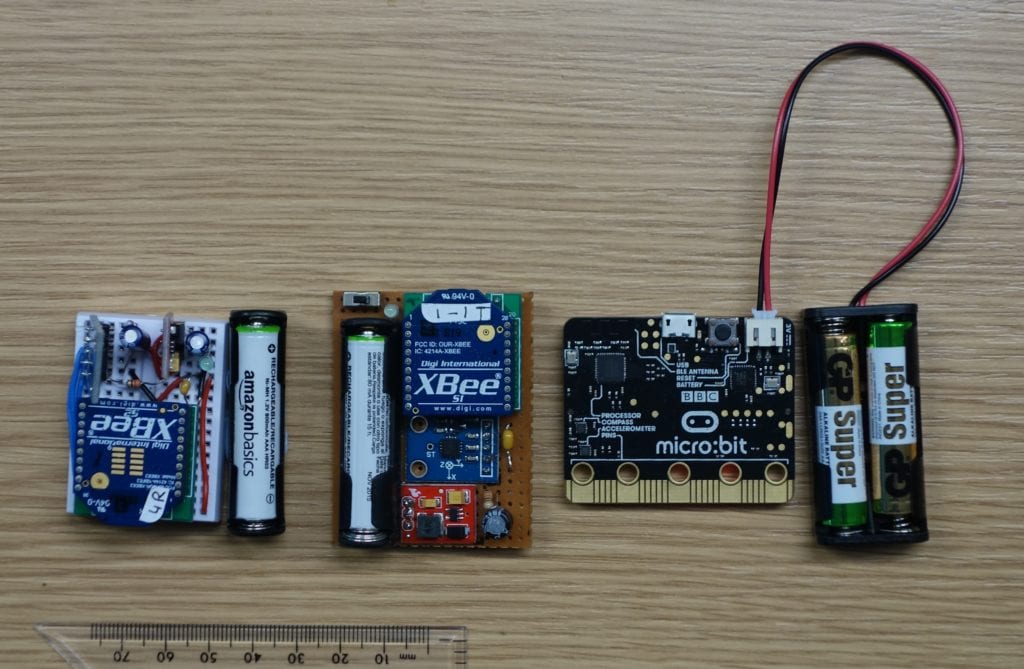
Early iterations: Xbee breadboard, Xbee prototype, and BBC micro:bit
What We Built
- Custom accelerometer board connected to the Pyboard
- Wireless communication via XBee radio modules
- Custom firmware to detect gestures on the device itself
What worked: The concept proved feasible. We could reliably detect intentional gestures.
What didn’t work: The hardware was bulky and not something anyone would want to wear. Form factor matters. If it looks medical and clunky, people abandon it—this is documented in AAC device research.
Key Learning
We had a working system, but the users wouldn’t wear it. A technologist told us: “Nice technology, but nobody’s going to wear this.” The form factor was wrong, and that was a deal-breaker.
Version 2: BBC micro:bit (2017-2019)
The BBC micro:bit was a revelation. Suddenly, we had:
- Built-in accelerometer
- Built-in wireless (board-to-board communication)
- Affordable (~£12 each)
- Small and wearable
- Programming in MicroPython
This felt like the right solution at the time.
What We Built
- micro:bit on the wrist (with custom orientation-invariant algorithm)
- Second micro:bit connected to the computer
- Wireless radio protocol between them
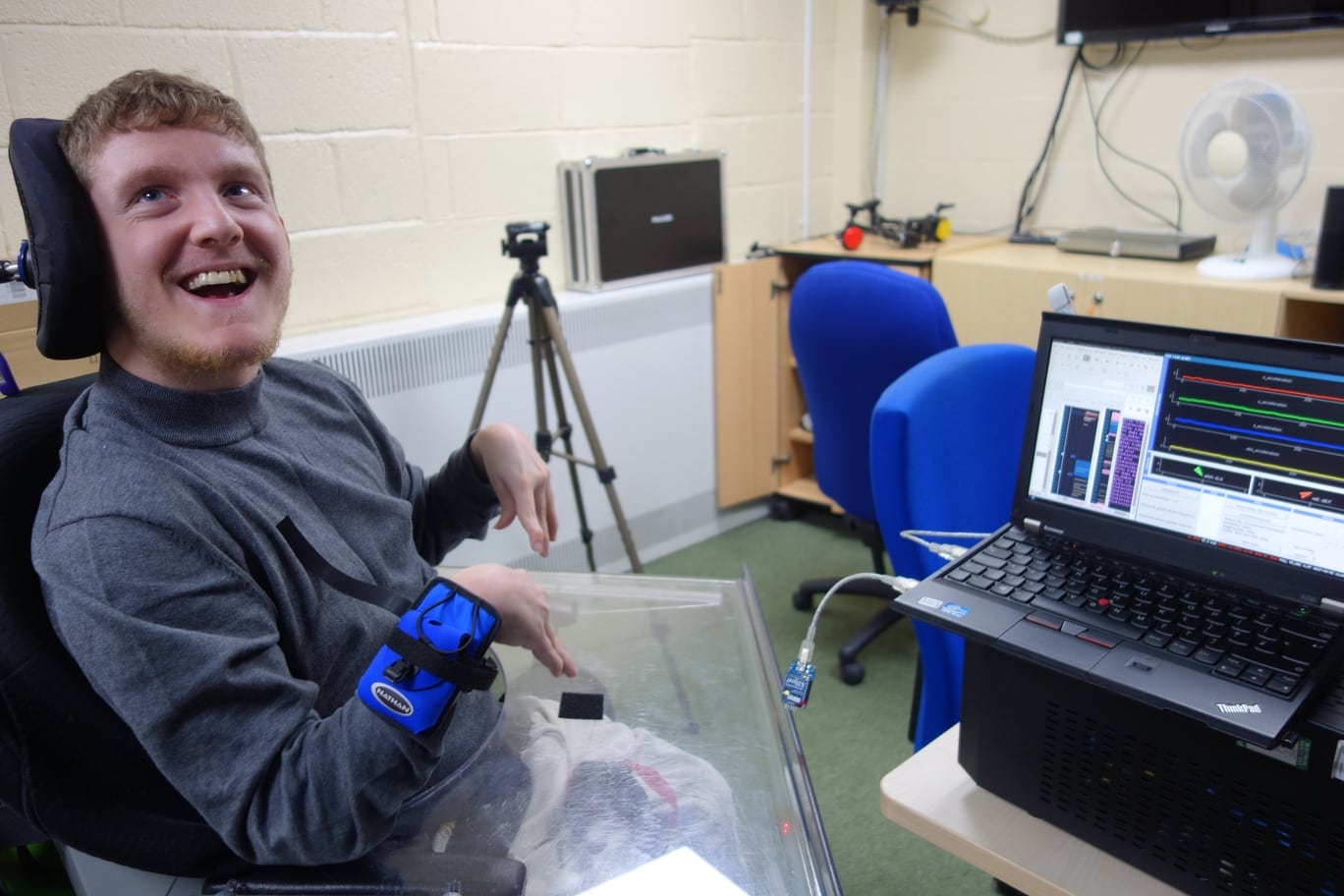
Testing with micro:bit hardware at Beaumont College
What Worked
- Reliability: The orientation-invariant algorithm worked consistently across different postures (sitting, lying down, in a wheelchair)
- Cost: Two boards at ~£12 each, plus minimal additional electronics
- Wearability: Better form factor than the Pyboard
- Results: We published this work at the Communication Matters conference and in their journal
What Didn’t Work
The form factor still wasn’t great. A micro:bit in a wristband looks… like a micro:bit in a wristband. It’s not something you’d voluntarily wear if you didn’t have to.
A lead technologist at the specialist college was honest: we needed something that looked more like a watch. Something attractive. Abandonment of AAC devices is a known problem in the field, and form factor plays a role.
The Integration Work
During the micro:bit era, we had to solve a technical problem: how do you get a micro:bit to trigger speech software on Windows?
With Grid 2 (the AAC software at the time), the micro:bit’s keyboard signals didn’t work. We had to use a Leostick—a small Arduino board that sat between the micro:bit and the computer, pretending to be a physical keyboard.
When Grid 3 arrived with Windows 10, it finally accepted software-generated keystrokes. The Leostick became unnecessary, which was a relief (one fewer thing to buy and configure).
Version 3: Lilygo Hardware (2023-Present)
By 2023, commercially available smart-watch platforms had improved dramatically. Lilygo started making incredibly well-manufactured boards aimed at hobbyists and tinkerers:
- T-Watch S3: Actual smart-watch form factor
- T-Embed: Small receiver module
- Both with ESP32-S3 chips (powerful, affordable, widely supported)
Why Make the Switch?
Form factor: Looks like a real watch. Not medical-looking. Something people would actually wear.
Affordability: Combined cost of ~$100 for a complete system, cheaper than earlier versions
Quality: Professionally manufactured devices, not hobbyist prototypes. Designed to be reliable.
Ecosystem: The ESP32 community is huge. I could leverage existing libraries and documentation.
Compatibility: Both boards use the same chip, so they could communicate via ESP_NOW protocol with minimal overhead.
The Learning Curve
When I first ported the code to the Lilygo hardware, I discovered something important: the “punch” algorithm didn’t work for everyone.
We tested with a participant at National Star in Gloucestershire. Their gesture didn’t generate the high-acceleration values that worked for others. The punch algorithm (which looks for total acceleration across all axes) kept missing the intentional gestures.
Rather than tweak the threshold, I wrote a new algorithm—the “roll” algorithm—that differentiated acceleration on a single axis. This worked for this person’s specific movement pattern. Nobody is more surprised than I am that I got this working.
This validated the entire UCD approach: the system adapted to individuals, not vice versa. A generic system would have missed this person entirely. Because I worked with the intended target group and their support staff I could tailor a solution for an individual.
Current Status
The Lilygo v3 system is:
- In regular use by participants at a specialist college
- Being tested with multiple gesture types (hand, foot, other limbs)
- Configured via a web interface for easy setup
- Ready for wider deployment
I’m working on a website-based firmware generator so people can configure and deploy HandShake themselves without my involvement. This is critical for scaling beyond a handful of users.
Research Validation
This work has been evaluated. I conducted user studies including:
- NATU Quest assessments: Standardized questionnaire for assistive technology usability
- Long-term deployment: Not just a demo, but months of regular use
- Real-world contexts: Used for communication, gaming, environmental control
- Multiple users: Validation with different individuals, movement patterns, and needs
Results:
- One primary user progressed from no digital AAC access method to independently using grid-based communication software, accessing environmental controls, and creating speech
- Three additional participants successfully used HandShake for gaming
- Scores on the NATU Quest scale indicate the system meets minimum usability requirements (3+/5) and reaches “usable” status (4+/5) for some users
- Users specifically noted the adaptability to their individual characteristics
All of this is documented in a peer-reviewed academic paper (currently under review).
What I Got Right
User-centered design: Involving users and their support staff at every iteration means handShake solves actual problems instead of imagined ones.
Choosing commercially available hardware: Building on the Pyboard, micro:bit, and Lilygo means other people have the choice of replicating and improving the system.
Pragmatic algorithms: Simple threshold-based detection works better than jumping on the AI/machine learning band wagon. Use the Right Tool for the Job. Simpler is usually better.
Adaptability: Having multiple algorithms (punch, roll) and per-individual calibration made the system flexible enough for real-world variation.
Form factor matters: A technically perfect system that nobody wants to wear is useless. The system has to look appealing. This is one of the first things a Lead Technologist told me.
What Was Harder Than Expected
Individual variation: I couldn’t write one algorithm that worked for everyone. I ended up with two algorithms and the flexibility to write more.
Calibration complexity: Getting the threshold “just right” is an art and a science. It requires someone experienced to do it well, ideally somebody who is familiar with the participant using the system.
Integration with AAC software: Each software generation (Grid 2 → Grid 3) required different approaches.
Deployment at scale: The current system works well with developer support. Getting it to work when someone in another country buys components and tries to set it up themselves is the current challenge I’m solving by building a configuration website.
Future Directions
Areas we’re exploring:
- Web-based configuration: So anyone can generate and deploy firmware without coding
- Additional algorithms: Specialized detection for different movement types
- Wireless receiver: Bluetooth operation of AAC so I don’t need the receiver module anymore
Areas others might explore:
- Machine learning for complex gesture patterns (once we have enough training data)
- Multi-gesture support (different switch actions for different movement patterns)
- Integration with gaming systems beyond Xbox
- Wearable variants on different limbs (ankle, elbow, etc.)
The Bigger Picture
AAC is hard. There’s so much diversity in people’s bodies and abilities that one-size-fits-all solutions always leave someone behind.
HandShake started as an answer to: “what about people who fall through all the cracks?” It’s still that. We’re not trying to replace eye-tracking or button-based systems. We’re trying to open access for people for whom none of the existing options work.
The user-centered design process—listening to the people who actually use the technology—turned out to be the most important part. Not the choice of hardware, not the algorithm sophistication, but listening to the users, their technologists, speech therapists and parents and asking: “What needs improving?”
References
This work draws on user-centered design methodologies described in:
- Dopp et al. (2019): “A glossary of user-centered design strategies for implementation experts”
Related work in gesture recognition for AAC includes:
- Curtis & Neate (2023): “Watch Your Language: Using Smartwatches to Support Communication”
- Koch Fager et al. (2019): “New and emerging access technologies for adults with complex communication needs”
A comprehensive academic paper describing the full research process is currently under review for publication.
Next: